
Spacewalk is an open source Linux systems management solution.
Spacewalk's capabilities include:
- Inventory
your systems (hardware and software information)
- Install
and update software on your systems
- Collect
and distribute your custom software packages into manageable groups
- Provision
(kickstart) your systems
- Manage and
deploy configuration files to your systems
- Provision
virtual guests
- Start/stop/configure
virtual guests
- Distribute
content across multiple geographical sites in an efficient manner
Requirements:
- Outbound open ports 80, 443
- Inbound open ports 80, 443, 5222 (only if you want to push
actions to client machines) and 5269 (only for push actions to a Spacewalk
Proxy), 69 udp if you want to use tftp
- Storage for database: 250 KiB per client system + 500 KiB
per channel + 230 KiB per package in channel (i.e. 1.1GiB for channel with 5000
packages)
- Storage for packages (default /var/satellite): Depends on
what you're storing; Red Hat recommend 6GB per channel for their channels
- 2GB RAM minimum, 4GB recommended
- Make sure your underlying OS is fully up-to-date.
Project page:
https://spacewalkproject.github.io/
Spacewalk repositories:
https://copr-be.cloud.fedoraproject.org/results/%40spacewalkproject/spacewalk-2.9/epel-7-x86_64/
Last build #00912457
Github:
https://github.com/spacewalkproject/spacewalk
EPEL 7 repositories
yum -y install epel-release
Step 1:
Configure hosts file
# vi /etc/hosts
127.0.0.1 localhost localhost.localdomain localhost4 localhost4.localdomain4
::1 localhost localhost.localdomain localhost6 localhost6.localdomain6
10.71.34.86 spacewalk.ibtechpa.local spacewalk
Install spacewalk repositories
# rpm -Uvh https://copr-be.cloud.fedoraproject.org/results/@spacewalkproject/spacewalk-2.9/epel-7-x86_64/00912457-spacewalk-repo/spacewalk-repo-2.9-4.el7.noarch.rpm
Install EPEL repositories
# yum -y install epel-release
Configure locale to avoid perl warning.
This can cause some issues when configuring spacewalk.
perl: warning: Setting locale failed.
perl: warning: Please check that your locale settings:
LANGUAGE = (unset),
LC_ALL = (unset),
LANG = "C.UTF-8"
are supported and installed on your system.
perl: warning: Falling back to the standard locale ("C").
Add these lines:
# vi /etc/environment
Update and reboot the OS
# yum -y update
# reboot
Step 2:
Configure firewalld
# firewall-cmd --permanent --add-service=http
# firewall-cmd --permanent --add-service=https
# firewall-cmd --permanent --add-port=69/udp --add-port=5222/tcp --add-port=5269/tcp
# firewall-cmd --reload
Install spacewalk embebbed database
# yum -y install spacewalk-setup-postgresql
Install spacewalk
# yum install -y spacewalk-postgresql
Step 3:
Configure spacewalk
[root@spacewalk ~]# spacewalk-setup
* Setting up SELinux..
** Database: Setting up database connection for PostgreSQL backend.
Database "rhnschema" does not exist
** Database: Installing the database:
** Database: This is a long process that is logged in:
** Database: /var/log/rhn/install_db.log
*** Progress: #
** Database: Installation complete.
** Database: Populating database.
*** Progress: ############################
* Configuring tomcat.
* Setting up users and groups.
** GPG: Initializing GPG and importing key.
** GPG: Creating /root/.gnupg directory
You must enter an email address.
Admin Email Address? info@ibtechpa.com
* Performing initial configuration.
* Configuring apache SSL virtual host.
Should setup configure apache's default ssl server for you (saves original ssl.conf) [Y]? y
** /etc/httpd/conf.d/ssl.conf has been backed up to ssl.conf-swsave
* Configuring jabberd.
* Creating SSL certificates.
CA certificate password?
You must enter a password.
CA certificate password?
Re-enter CA certificate password?
Cname alias of the machine (comma seperated)? spacewalk
Organization? ibtechpa
Organization Unit [spacewalk.ibtechpa.local]?
Email Address [admin@ibtechpa.com]?
City?
City? Panama
State? Panama
Country code (Examples: "US", "JP", "IN", or type "?" to see a list)? PA
** SSL: Generating CA certificate.
** SSL: Deploying CA certificate.
** SSL: Generating server certificate.
** SSL: Storing SSL certificates.
* Deploying configuration files.
* Update configuration in database.
* Setting up Cobbler..
Cobbler requires tftp and xinetd services be turned on for PXE provisioning functionality. Enable these services [Y]?
* Restarting services.
Installation complete.
Visit https://spacewalk.ibtechpa.local to create the Spacewalk administrator account.
[root@spacewalk ~]#
Validate services its OK:
# spacewalk-service status
Step 4:
Open your browser and use IP address:
https://10.71.34.86
Domain name:
https://spacewalk.ibtechpa.local
Create administrator account and set your password:

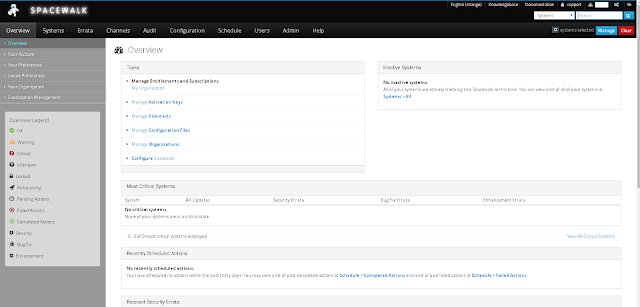
You are ready to start managing spacewalk:
https://copr-be.cloud.fedoraproject.org/results/%40spacewalkproject/spacewalk-2.9/epel-7-x86_64/
Last build #00912457
Github:
https://github.com/spacewalkproject/spacewalk
EPEL 7 repositories
yum -y install epel-release
Step 1:
Configure hosts file
# vi /etc/hosts
127.0.0.1 localhost localhost.localdomain localhost4 localhost4.localdomain4
::1 localhost localhost.localdomain localhost6 localhost6.localdomain6
10.71.34.86 spacewalk.ibtechpa.local spacewalk
Install spacewalk repositories
# rpm -Uvh https://copr-be.cloud.fedoraproject.org/results/@spacewalkproject/spacewalk-2.9/epel-7-x86_64/00912457-spacewalk-repo/spacewalk-repo-2.9-4.el7.noarch.rpm
Install EPEL repositories
# yum -y install epel-release
Configure locale to avoid perl warning.
This can cause some issues when configuring spacewalk.
perl: warning: Setting locale failed.
perl: warning: Please check that your locale settings:
LANGUAGE = (unset),
LC_ALL = (unset),
LANG = "C.UTF-8"
are supported and installed on your system.
perl: warning: Falling back to the standard locale ("C").
Add these lines:
# vi /etc/environment
LC_ALL="en_US.UTF-8"
LC_CTYPE="en_US.UTF-8"
LANGUAGE="en_US.UTF-8"
LC_CTYPE="en_US.UTF-8"
LANGUAGE="en_US.UTF-8"
Update and reboot the OS
# yum -y update
# reboot
Step 2:
Configure firewalld
# firewall-cmd --permanent --add-service=http
# firewall-cmd --permanent --add-service=https
# firewall-cmd --permanent --add-port=69/udp --add-port=5222/tcp --add-port=5269/tcp
# firewall-cmd --reload
Install spacewalk embebbed database
# yum -y install spacewalk-setup-postgresql
Install spacewalk
# yum install -y spacewalk-postgresql
Step 3:
Configure spacewalk
[root@spacewalk ~]# spacewalk-setup
* Setting up SELinux..
** Database: Setting up database connection for PostgreSQL backend.
Database "rhnschema" does not exist
** Database: Installing the database:
** Database: This is a long process that is logged in:
** Database: /var/log/rhn/install_db.log
*** Progress: #
** Database: Installation complete.
** Database: Populating database.
*** Progress: ############################
* Configuring tomcat.
* Setting up users and groups.
** GPG: Initializing GPG and importing key.
** GPG: Creating /root/.gnupg directory
You must enter an email address.
Admin Email Address? info@ibtechpa.com
* Performing initial configuration.
* Configuring apache SSL virtual host.
Should setup configure apache's default ssl server for you (saves original ssl.conf) [Y]? y
** /etc/httpd/conf.d/ssl.conf has been backed up to ssl.conf-swsave
* Configuring jabberd.
* Creating SSL certificates.
CA certificate password?
You must enter a password.
CA certificate password?
Re-enter CA certificate password?
Cname alias of the machine (comma seperated)? spacewalk
Organization? ibtechpa
Organization Unit [spacewalk.ibtechpa.local]?
Email Address [admin@ibtechpa.com]?
City?
City? Panama
State? Panama
Country code (Examples: "US", "JP", "IN", or type "?" to see a list)? PA
** SSL: Generating CA certificate.
** SSL: Deploying CA certificate.
** SSL: Generating server certificate.
** SSL: Storing SSL certificates.
* Deploying configuration files.
* Update configuration in database.
* Setting up Cobbler..
Cobbler requires tftp and xinetd services be turned on for PXE provisioning functionality. Enable these services [Y]?
* Restarting services.
Installation complete.
Visit https://spacewalk.ibtechpa.local to create the Spacewalk administrator account.
[root@spacewalk ~]#
Validate services its OK:
# spacewalk-service status
Step 4:
Open your browser and use IP address:
https://10.71.34.86
Domain name:
https://spacewalk.ibtechpa.local
Create administrator account and set your password:

You are ready to start managing spacewalk:

